

Launch price: $99 first month, only for our first 5 clients
Free Google Maps rank checker for your Google Business Profile
See where you show up on Google Maps. Then let us work on it.
Free scan of about 10 keywords your customers search, with your current Google Maps position for each. Then a dedicated specialist for your business works every month to increase your brand visibility, with a before and after report on day 30.
Keyword Boost is a free Google Maps rank checker for US local businesses. It picks about 10 keywords customers search for your category and city, shows your Google Business Profile position for each, and names the 3 businesses above you. Paid GBP plans start at $199/month.
Suggestions from Google Maps
Free, no login, about 20 seconds. Typing a name? Pick your business from the suggestions.
Reviews matter too: compare your Google reviews with nearby businesses.
- 350+clients served
- Since 2017in digital marketing
- Month to monthcancel anytime, no contract
- Day-30 reportbefore and after positions
Your Google Maps positions
-
| Keyword | Google Maps position |
|---|
Positions are approximate. We searched each keyword on Google Maps from your business location, the way a nearby customer might, and looked for your listing in the top 20. Real results change with the searcher’s exact location, device and history, so treat this as a snapshot, not a promise.
Your competitors are getting the calls you’re missing
These businesses showed up above you in this scan:
Every month you wait, they take more of your customers.
Boost these keywords
$99 first month, then $199/mo
A dedicated specialist for your business works on your Google Business Profile every month, aimed at these keywords:
- Full profile audit and optimization for these keywords
- 4 Google posts a month, plus review replies
- A work log you can see any time on your private dashboard
- A day-30 before and after position report, then monthly reports
We promise the work and honest reporting. Nobody can honestly promise a specific ranking, and we don’t. Need more keywords? Growth tracks 20 and Pro tracks 40.
Launch price: the $99 button is a one-time first-month payment, only for our first 5 clients; before month 2 we email your regular $199/month link. The other button starts at the regular $199/month. Month to month, cancel anytime before your next billing date. By paying you agree to our Service Terms.
Refer a business that signs up and get a free month. How referrals work.
Your scan reference: - (we use it to link this scan to your account).
Fix it now one-time
GMB Profile Makeover: $49 one-time
Not ready for a monthly plan? In 48 hours our specialists rework your description, categories, services, hours, Q&As and first posts, once.
Fix it now · $49Fix it now one-time
Directory Listings Pack: $99 one-time
30 directory listings fixed or created with a consistent name, address and phone, delivered in 7 days.
Fix it now · $99Based on public Google Places data. Not affiliated with Google.
Free scan
What your scan shows
About 10 keywords local customers search for a business like yours, each with your current Google Maps position from your business location, plus the businesses ranked above you. Positions are approximate snapshots, not promises. Customers also ask questions under YouTube videos; our free YouTube comment checker shows which still have no reply.
| Keyword | Google Maps position |
|---|---|
| plumber near me | #14 |
| emergency plumber dallas | #6 |
| water heater repair dallas | #3 |
| drain cleaning dallas | Not in top 20 |
| leak detection dallas | #9 |
Sample rank grid
Why your Google Maps position changes across town
Google ranks local results partly by distance, so the same search can put you 2nd near your shop and outside the top 20 a few miles away. A rank grid makes that visible: each dot is the same keyword searched from a different point around your business.
Our free scan checks from one point, your business location (the outlined dot). Clients get every tracked keyword re-checked weekly from that same point, so changes are easy to compare.
How it works
How the free Google Maps rank checker works
Enter your business
Type your website, paste your Google Maps link or start typing your business name and pick it from the suggestions.
We search like a nearby customer
We pick about 10 keywords for your category and city and search each one on Google Maps from your business location, looking for your listing in the top 20.
See where you rank
In about 20 seconds you see your position for each keyword and the businesses above you. Free, no login, no card.
Competitors
You vs the 3 businesses above you
The scan names the real businesses that showed up above you. Profiles that rank higher usually have a stronger primary category, more complete information and a steadier flow of recent reviews. That is where our specialists start.
| Business | Position | Reviews | Photos |
|---|---|---|---|
| Competitor A | #1 | 412 | 160 |
| Competitor B | #2 | 310 | 110 |
| Competitor C | #3 | 228 | 85 |
| You | #14 | 74 | 22 |
A free Google My Business ranking checker that picks the keywords for you
Most Google Maps rank checkers make you do the hard part first: guess which keyword to test. Keyword Boost works the other way round. Enter your website, your Google Maps link or your business name, and we find about 10 keywords that local customers search for a business like yours, then show where your Google Business Profile (the listing formerly called Google My Business) appears on Google Maps for each one.
It's free, there's no login, and a scan takes about 20 seconds. You don't need to know any SEO terms to read the result: each keyword gets a position number, or a dash if your listing wasn't in the top 20.
How to check your Google Maps ranking with Keyword Boost
- Enter your business. Paste your website address, paste the Google Maps link to your listing, or type your business name and pick it from the suggestions. Picking the real listing matters, because a hand-typed name can match the wrong business.
- We build your keyword list. We look at your categories, services and location and choose around 10 searches a nearby customer is likely to make, such as "emergency plumber near me" or "AC repair" plus your town.
- We check each keyword. For every keyword we search Google Maps from your business location, the way a nearby customer would, and look for your listing in the top 20.
- You read the results. You see each keyword with its Google Maps position, plus the businesses that showed up above you.
Prefer to check by hand as well? Our guide on how to check your Google Maps ranking accurately shows how to run a fair manual check from a private window, so you can compare it with your scan.
What your Google Maps position means
Google Maps doesn't have one fixed ranking. Google says local results are mainly based on relevance, distance and prominence, so the same search can show a different order a few streets away, on a different phone, or for someone with a different search history. That's why any single number, from any tool, is a snapshot rather than a fact about "your rank".
Use the numbers like this:
- Positions 1 to 3: you're likely in the map pack, the three listings Google shows at the top of local searches. Protect these spots with steady reviews, posts and accurate information.
- Positions 4 to 10: you're close. These keywords usually respond best to profile work, because you're already relevant; you just need to look like the stronger choice.
- Positions 11 to 20: Google sees you as related but not a strong match yet. Categories, services and the content on your website are the usual gaps.
- Not in the top 20 (a dash): either Google doesn't connect your profile with that search at all, or a lot of nearby businesses are stronger for it. Start with the basics: verification, primary category and services.
If you're missing from every keyword, check that your profile is verified and live first.
Google Maps rank checker vs local rank tracker: which do you need?
A rank checker answers one question once: where do I stand right now? A local rank tracker repeats those checks on a schedule and keeps the history, so you can see whether things are moving. Tools such as BrightLocal, Local Falcon and Whitespark are well-known paid trackers, and many of them use a geo-grid: they check the same keyword from dozens of points across your area and show the results as a heatmap.
Keyword Boost's free scan is a checker. It searches from one point, your business location, which is a fair picture of what a customer close to you sees, but it won't show how your visibility drops off across town. If you're a service-area business covering a whole metro, a grid view is useful too, and there's nothing wrong with using a free grid checker alongside ours.
When you become a client, the scan turns into a tracker: we re-check your keywords every week, show start versus latest position on your private dashboard, and send a before-and-after report on day 30.
Why your competitors outrank you on Google Maps
The scan lists the businesses that showed up above you. The reasons they rank higher are almost always some mix of these:
- A better primary category. Your primary category is one of the strongest relevance signals you control. "Plumber" and "Plumbing supply store" are not the same thing to Google.
- More complete information. Services, service areas, hours, attributes, photos and a clear description help Google match a profile to more searches.
- More recent reviews. Google lists review count and rating as part of prominence. A steady flow of genuine reviews, with replies, tends to beat a large pile of old ones.
- A stronger website. Prominence also draws on what Google knows from the web: links to your site, how well your pages explain your services and location, and whether your name, address and phone match everywhere.
- Distance. Some competitors are simply closer to where the search happened. You can't move, but you can be the more relevant and more trusted choice for the people who are nearby.
Google is clear that you can't pay to rank higher on Google Maps. Anyone who promises a specific position is promising something they don't control.
How it works
Three steps, no calls needed.
- 01 · SCAN
See your keywords
Run the free scan above. You get about 10 local keywords and where your business shows up on Google Maps for each one today.
- 02 · BOOST
We get to work
Pick a plan. Our Google Maps specialists work on your profile every month, aimed at your keywords, and log every task on your private dashboard.
- 03 · DAY-30 REPORT
See what changed
On day 30 we re-check every keyword and email you a before and after report. After that, we keep re-checking weekly and report monthly.
Every month
What our Google Maps specialists do.
- Profile optimizationCategories, services, description, hours, photos and attributes, aimed at your keywords.
- Google posts4 posts a month on Starter; weekly posts and offers on Growth and Pro.
- Review repliesWe reply to your Google reviews on every plan. Growth and Pro add a review-request link and QR code.
- Listings and citationsDirectory building and cleanup so your name, address and phone match everywhere (Growth and Pro).
- Rank tracking10, 20 or 40 tracked keywords re-checked weekly on your dashboard.
- ReportingA work log you can see anytime, a day-30 before and after report, then monthly reports.
Your dashboard
Everything in one private link.
Start vs latest position for every keyword, the work done, your Google Business Profile stats once you give us access, plus CSV and printable reports. No passwords: a private link in your welcome email.
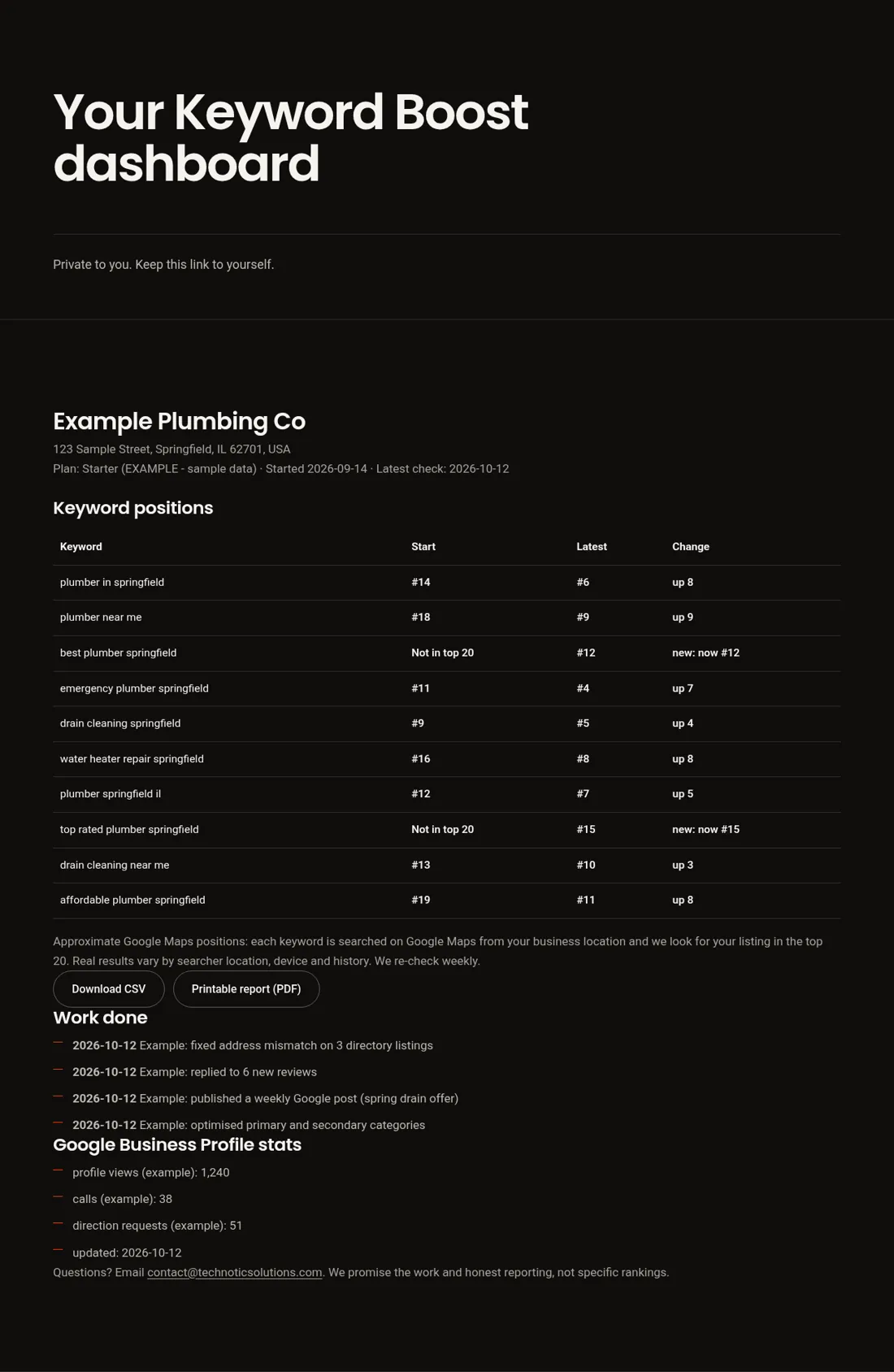
Example dashboard - sample data. The business, keywords and numbers are invented for illustration.
What happens when you click "Boost these keywords"
If you'd rather not do the work yourself, the "Boost these keywords" button lets you hand those exact keywords to us. Every plan is month to month:
- Starter, $199/month: 10 tracked keywords, a full profile audit and optimization aimed at them, 4 Google posts a month, review replies, a work log on your dashboard and a day-30 before-and-after report.
- Growth, $349/month: 20 tracked keywords, everything in Starter, plus weekly posts and offers, directory building and cleanup, a review-request link and QR code, competitor and map-rank tracking, and one local page or blog post a month.
- Pro, $599/month: 40 tracked keywords, everything in Growth, two local pages or blog posts a month, help with suspended profiles and priority support.
A dedicated specialist for your business works on your profile every month and logs every task where you can see it. We promise the work and honest reporting. We don't promise rankings, because Google decides those.
Pricing
Pick your plan. Cancel anytime.
Starter
A solid, well-maintained profile.
Launch offer$99 for your first month
For our first 5 US clients. Then $199/month, month to month, cancel anytime.
Claim the $99 first monthOne-time $99 payment for your first month. Before month 2 we’ll send your regular $199/month Starter subscription link. Direct business clients only.
- 10 tracked keywords
- Full profile audit & optimization
- 4 Google posts/month
- Review replies
- Monthly report + day-30 before/after report
Growth
Compete in the map pack.
- 20 tracked keywords
- Everything in Starter
- Weekly posts + offers
- Directory building & cleanup
- Review-request link & QR code
- Competitor & map-rank tracking
- 1 local page or blog post per month
Pro
Multi-area operators and tougher markets.
- 40 tracked keywords
- Everything in Growth
- 2 local pages or blog posts per month
- Help with suspended profiles
- Priority support
Month to month, cancel anytime before your next billing date. Your first month is charged today; after that we email a secure payment link each month. By paying you agree to our Service Terms. We don’t guarantee rankings; Google decides.
Know another business owner? Clients get one free month for every business they refer that signs up. Your referral link is on your dashboard.
How long does it take to rank higher on Google Maps?
There's no fixed timeline, and you should be wary of anyone who gives you one. In our experience, fixes to categories, services and basic information are usually the first changes to show up, sometimes within a few weeks, because they change how relevant Google thinks you are. Gains that depend on reviews, links and website content build more slowly, over months. Keywords where you start between positions 4 and 10 usually move sooner than keywords where you're not in the top 20 at all.
That's why your day-30 report compares every keyword's starting and latest position honestly, including the ones that haven't moved yet, and explains what we're doing next for each.
Who Keyword Boost is for
Keyword Boost is built for US local businesses that get customers from Google Maps: HVAC companies, plumbers, roofers, dentists, pest control firms and other home and local services. It works for storefronts and for service-area businesses that hide their address. It isn't designed for national online-only brands, because Google Maps rankings only apply to businesses with a real local presence.
FAQ
Questions, answered honestly.
Is there a contract?
No. Every plan is month to month with no setup fees and no long-term contract. You pay for one month at a time and can cancel anytime before your next billing date.
Can I cancel anytime?
Yes. Email contact@technoticsolutions.com before your next billing date and we stop there. There are no cancellation fees, and you keep everything we built on your Google Business Profile.
Do you guarantee rankings?
No. Google decides rankings, and nobody can honestly promise a position. We promise the work: a dedicated specialist working on your profile and keywords every month, plus honest reporting so you can see exactly what changed.
How long do results take?
It varies by market and competition, so we make no promises. Early movement often shows within a few weeks, and more meaningful change usually takes about two to three months of steady work.
What access do you need?
Manager access to your Google Business Profile, so our specialists can optimise it. Your dashboard shows six simple steps to invite contact@technoticsolutions.com, and you can remove our access anytime.
What happens if I stop paying?
There's no contract. If you stop paying, work pauses straight away and we keep your data and keyword history for 60 days, so you can restart where you left off. After 60 days your data is deleted.
What happens on day 30?
We re-check every tracked keyword and email you a before and after report comparing your starting Google Maps positions with today, plus a summary of the work done. You can also see it anytime on your dashboard.
Is this Google My Business ranking checker really free?
Yes. The scan is free, needs no login and no card, and shows about 10 keywords with your current Google Maps positions. You only pay if you choose a plan to have us work on those keywords.
How do I check my Google Maps ranking for a specific keyword?
Run the free scan with your website, Google Maps link or business name. We pick around 10 relevant keywords and check each one on Google Maps from your business location. If a keyword you care about isn't in the list, tell us when you sign up and we can add it to your tracked keywords.
Why is my Google Maps ranking different when I search myself?
Google personalizes local results by the searcher's exact location, device and search history. Searching from your own phone at your office usually makes you look better than you do to a new customer across town. Our scan searches from your business location without your personal history, so treat it as a neutral snapshot.
Is Keyword Boost a local rank tracker?
The free scan is a one-time rank check. For clients it becomes a tracker: we re-check every tracked keyword weekly and show the start and latest position on a private dashboard, with a day-30 before-and-after report and monthly reports after that.
Is Google My Business the same as Google Business Profile?
Yes. Google renamed Google My Business to Google Business Profile. People still search for both names, and they mean the same free listing that appears on Google Maps and in local search results.
Can you promise my business will rank in the top 3?
No. Google decides local rankings based on relevance, distance and prominence, and nobody can honestly promise a position. We promise the work, a visible work log and honest before-and-after reporting.
How accurate is this Google Maps rank checker?
Each position comes from a live Google Maps search for that keyword, run from your business location, and we look for your listing in the top 20. That makes it a fair snapshot from that spot at that moment. A customer searching from across town, on a different device or with their own search history can see a different order, so treat the numbers as approximate.
How often can I check my Google Maps ranking for free?
Up to 3 free scans an hour and 6 a day from one connection, and results for the same business are cached for 24 hours. Rankings rarely change from one day to the next, so checking about once a month is enough for most businesses. Clients get every tracked keyword re-checked weekly.
What is a Google Maps rank grid?
A rank grid shows one keyword's Google Maps position from many points around your business, laid out like a map. It shows how your visibility changes from street to street. Our free scan checks one point, your business location; the grid on this page is example data that shows why positions vary across a neighborhood.
Find out where you stand today.
The scan is free and takes about 20 seconds. Every week you wait, they get the calls.
Free checks
Next free check
Want a heads-up when a nearby competitor moves above you in Google Maps? Get a monthly Local Competitor Alert.